Written by Md Rakib Hassan — Income Tax Practitioner with 10+ years of tax compliance and audit experience across Bangladesh and the UK. Former accounts manager at a UK chartered accounting firm managing 1,000+ clients, with direct experience resolving multi-year tax audit disputes with HMRC and the NBR. Currently Finance Controller at a UK-based multinational tech group.
Two of the most practically searched questions in Bangladesh’s finance and accounting ecosystem are how to calculate VAT and how to submit VAT return online. Both seem simple. Both have pitfalls that cost businesses significant money when handled incorrectly. In my decade of working with NBR audits and HMRC compliance, I have seen VAT calculation errors compound across months of returns, producing cumulative liabilities that could have been avoided with a clear understanding of the formulas from day one.
This guide covers everything: the core formulas for how to calculate VAT at Bangladesh’s 15% standard rate and reduced rates, how to add VAT to a price, how to calculate VAT inclusive and VAT exclusive amounts, how to calculate the VAT return payable figure, how to do these calculations in Excel, how to calculate 15 percent VAT specifically, and the complete step-by-step process for how to submit VAT return online in Bangladesh and the UK. And for businesses wondering how to pay VAT once the return is filed — that is covered too.
The Core VAT Formulas: What You Need to Know
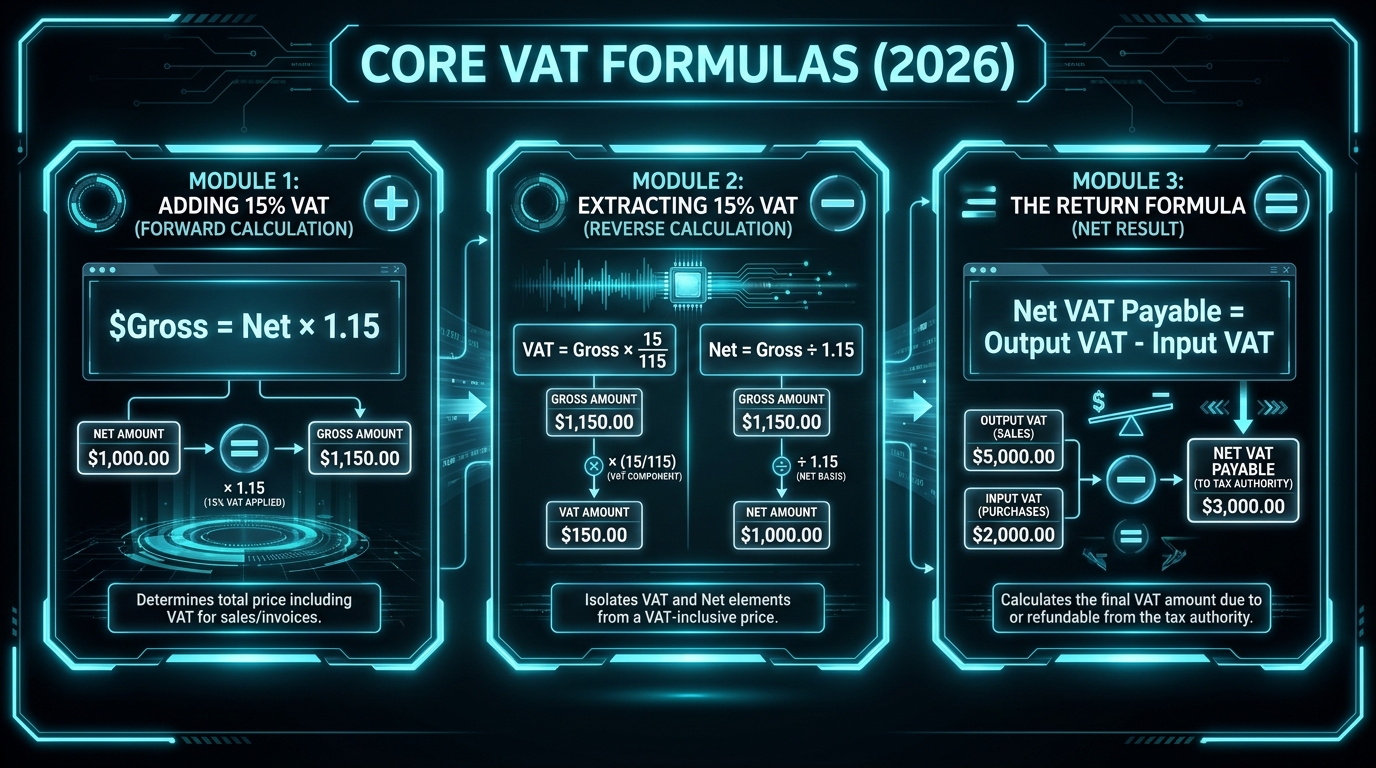
Before addressing how to calculate VAT in specific scenarios, here are the four foundational formulas used in every VAT-related calculation in Bangladesh and the UK:
Formula 1: How to Add VAT to a Price (VAT Exclusive → VAT Inclusive)
VAT Amount = Net Price × (VAT Rate ÷ 100) Gross Price = Net Price + VAT Amount
Simplified:
Gross Price = Net Price × (1 + VAT Rate ÷ 100)
At Bangladesh’s standard 15% VAT rate:
Gross Price = Net Price × 1.15
At UK’s standard 20% VAT rate:
Gross Price = Net Price × 1.20
Formula 2: How to Calculate VAT Inclusive (Reverse / Extract VAT from Gross Price)
VAT Amount = Gross Price × VAT Rate ÷ (100 + VAT Rate) Net Price = Gross Price − VAT Amount
Simplified:
Net Price = Gross Price ÷ (1 + VAT Rate ÷ 100)
At Bangladesh’s 15% VAT rate:
VAT Amount = Gross Price × 15 ÷ 115 Net Price = Gross Price ÷ 1.15
At UK’s 20% VAT rate:
VAT Amount = Gross Price × 20 ÷ 120 = Gross Price ÷ 6 Net Price = Gross Price ÷ 1.20
Formula 3: How to Calculate VAT Payable (for VAT Return)
Net VAT Payable = Output VAT − Input VAT
If Output VAT > Input VAT → Pay to NBR/HMRC If Input VAT > Output VAT → Carry forward credit (or apply for refund)
Formula 4: How to Calculate VAT Exclusive (Remove VAT from VAT-Inclusive Price)
This is identical to Formula 2 — extracting the net price from a VAT-inclusive amount.
Net (VAT Exclusive) Price = Gross (VAT Inclusive) Price ÷ (1 + VAT Rate ÷ 100)
How to Calculate 15 Percent VAT (Bangladesh Standard Rate)
Bangladesh’s most important VAT calculation is the standard 15% rate. Here are worked examples covering every scenario a business commonly faces:
Scenario A: How to Add VAT to a Price at 15%
Situation: You are a trader selling goods with a net value of BDT 10,000. Your customer is VAT-registered and your Mushak 6.3 invoice must show VAT separately.
- VAT Amount = 10,000 × 15 ÷ 100 = BDT 1,500
- Invoice Total (VAT Inclusive) = 10,000 + 1,500 = BDT 11,500
Your Mushak 6.3 shows: Net BDT 10,000 | VAT @ 15% BDT 1,500 | Total BDT 11,500

Scenario B: How to Calculate VAT Inclusive (Extract from Gross)
Situation: You purchased goods for BDT 11,500 (VAT inclusive at 15%). You need to know the VAT component to claim as input credit on your monthly return.
- VAT Amount = 11,500 × 15 ÷ 115 = BDT 1,500
- Net Price = 11,500 − 1,500 = BDT 10,000
Or: Net Price = 11,500 ÷ 1.15 = BDT 10,000
Scenario C: The NBR Official Calculation Method (Value Addition)
The NBR’s own example, from nbr.gov.bd/faq/vat-faq/eng, illustrates the true value-added mechanism of VAT at 15%:
A manufacturer buys goods for BDT 1,000 and sells for BDT 1,500:
- Input VAT paid on purchase = 1,000 × 15 ÷ 115 = BDT 130.43
- Output VAT charged on sale = 1,500 × 15 ÷ 115 = BDT 195.65
- Net VAT remitted to government = 195.65 − 130.43 = BDT 65.22
Note that BDT 65.22 is exactly 15% of BDT 434.78 — the net value added (BDT 500 sale markup minus the VAT embedded in it). This is the elegance of the VAT mechanism: you pay tax only on the value you added.
Scenario D: How to Calculate VAT Amount for a Service at 7.5%
Situation: An accounting firm bills BDT 50,000 for audit services (VAT rate for audit/accounting services in Bangladesh: 7.5%):
- VAT Amount = 50,000 × 7.5 ÷ 100 = BDT 3,750
- Invoice Total = 50,000 + 3,750 = BDT 53,750
Scenario E: How to Calculate 15 Percent VAT on Import
VAT on imports in Bangladesh is calculated on the VAT-imposable value — which includes customs duty, regulatory duty, supplementary duty, and other applicable charges (but not VAT itself or advance income tax).
Example: Imported goods with a dutiable value of BDT 1,00,000. Applicable duties: Import Duty 25%, Regulatory Duty 3%, Supplementary Duty 20%.
| Item | Calculation | Amount |
|---|---|---|
| Dutiable Value (DV) | — | BDT 1,00,000 |
| Import Duty (25%) | 1,00,000 × 25% | BDT 25,000 |
| Regulatory Duty (3%) | 1,00,000 × 3% | BDT 3,000 |
| Supplementary Duty (20%) | 1,00,000 × 20% | BDT 20,000 |
| VAT Imposable Value | DV + ID + RD + SD | BDT 1,48,000 |
| VAT (15%) | 1,48,000 × 15% | BDT 22,200 |
This VAT paid at import (BDT 22,200) is claimable as input VAT credit on your VAT return — reducing your net VAT payable to NBR.

How to Calculate VAT in Excel
How to calculate VAT in Excel is one of the most practically useful skills for any accountant or business finance professional in Bangladesh. Here are the exact formulas:
Excel Setup
Assume:
- Column A = Description
- Column B = Net Amount (VAT Exclusive)
- Column C = VAT Rate (as a decimal: 0.15 for 15%, 0.075 for 7.5%)
- Column D = VAT Amount
- Column E = Gross Amount (VAT Inclusive)
Excel Formulas
Adding VAT (calculating VAT amount and gross price):
=B2*C2          [in D2 — VAT Amount]
=B2+D2          [in E2 — Gross Amount]
Or combined: =B2*(1+C2) in E2
Extracting VAT from a VAT-inclusive amount: If Column B contains the gross (VAT-inclusive) price:
=B2*C2/(1+C2)   [VAT Amount]
=B2/(1+C2)      [Net Amount]
At exactly 15%:
=B2*15/115      [VAT Amount from VAT-inclusive price]
=B2/1.15        [Net Amount from VAT-inclusive price]
Calculating net VAT payable for a return:
=SUM(Output_VAT_range)-SUM(Input_VAT_range)Professional Excel VAT Tracker Template Structure
For a monthly VAT tracker that feeds into your Mushak 9.1:
| Column | Data |
|---|---|
| A | Transaction date |
| B | Supplier/Customer name |
| C | BIN of counterparty |
| D | Mushak 6.3 invoice number |
| E | Net amount |
| F | VAT rate |
| G | VAT amount (=E*F) |
| H | Gross amount (=E+G) |
| I | Sales or Purchase (S/P) |
Monthly totals: Sum all G values where I=”S” for Output VAT; Sum all G values where I=”P” for Input VAT. Net VAT Payable = Output − Input.
How to Calculate VAT and Tax Together
How to calculate VAT and tax in the same transaction is relevant for businesses where both VAT and Supplementary Duty (SD) apply, or where Advance Tax (AT) is involved at the import stage.
Scenario: VAT and SD on a domestic supply
An electronics retailer sells a high-end television with market retail price BDT 50,000. Supplementary Duty (SD) rate: 10%.
Step 1 — Calculate SD:
SD Imposable Value = Market Price − Tax Fraction SD = 50,000 × (10 ÷ 110) = BDT 4,545.45
Step 2 — Calculate VAT Imposable Value:
VAT Imposable Value = Market Price (inclusive of SD but before VAT) Effectively: SD Imposable Value + SD = BDT 45,454.55 + 4,545.45 = BDT 50,000
Step 3 — Calculate VAT:
VAT = VAT Imposable Value × 15% VAT = (50,000 − 50,000 × 15/115) = 50,000 × 15/115 = BDT 6,521.74
Total tax incidence on a BDT 50,000 retail price: SD BDT 4,545.45 + VAT BDT 6,521.74 = BDT 11,067.19
For complex combined tax calculations, NBR’s official VAT calculator at nbr.gov.bd/e-services/vatcalculator/en is the authoritative tool.
How to Calculate VAT Return (Net VAT Payable for Mushak 9.1)
How to calculate VAT return — specifically, the net figure you need to pay when filing Mushak 9.1 — follows this structure:
| Line | Item | Amount (BDT) |
|---|---|---|
| 1 | Total Output VAT (VAT on sales at all rates) | X |
| 2 | Less: Input VAT (VAT on qualifying purchases) | (Y) |
| 3 | Less: VDS credits received (Mushak 6.6) | (Z) |
| 4 | Less: Advance Tax (AT) paid on imports | (A) |
| 5 | Add/Less: Closing balance from previous month | ± B |
| 6 | Net VAT Payable = 1 − 2 − 3 − 4 ± 5 | = Net Payable |
If Line 6 is positive → pay this amount to the government by the 15th of the month If Line 6 is negative → carry forward as a credit to next month’s return
How to calculate VAT payable in practice:
Example for a trading company for January 2026:
- Total sales: BDT 20,00,000 | Output VAT @ 15%: BDT 3,00,000
- Total purchases: BDT 12,00,000 | Input VAT @ 15%: BDT 1,80,000
- VDS certificates received: BDT 15,000
- Previous month closing balance (credit): BDT 5,000
Net VAT Payable = 3,00,000 − 1,80,000 − 15,000 − 5,000 = BDT 1,00,000
How to Submit VAT Return Online in Bangladesh: Step-by-Step
Now that you know how to calculate VAT, here is the complete process for how to submit VAT return online through the NBR’s portal at vat.gov.bd:
Step 1: Prepare Your Monthly VAT Data
Before logging in, compile:
- Sales data from your Mushak 6.2 Sales Register — total taxable sales by rate category
- Purchase data from your Mushak 6.1 Purchase Register — total qualifying purchases and VAT paid
- VDS certificates (Mushak 6.6) received from customers who withheld VAT
- Credit/Debit notes (Mushak 6.7/6.8) for returns or adjustments
- Advance Tax paid on imports during the period
- Previous month’s closing balance from your last Mushak 9.1
Step 2: Log Into vat.gov.bd
Visit vat.gov.bd and log in with your BIN and password. From the dashboard, navigate to “Return” → “Mushak 9.1” → select the tax period (month and year).
Step 3: Fill in the Mushak 9.1 VAT Return Submission Form
Work through each part of the form:
Part 1 — Taxable Supplies (Output VAT): Enter sales totals by category:
- Standard-rated supplies (15%): quantity, value, VAT amount
- Reduced-rate supplies: applicable rate, value, VAT amount
- Zero-rated exports: value (zero VAT)
- Exempt supplies: value (zero VAT, no input credit)
Part 2 — Taxable Purchases (Input VAT): Enter purchase totals:
- Local purchases with valid Mushak 6.3 invoices: value, input VAT
- Imports with customs documentation: value, VAT paid
Part 3 — VDS and Other Adjustments: Enter VDS certificate amounts, advance tax credits, and previous month balance.
Part 4 — Net VAT Payable: The system automatically calculates the net figure based on your entries.
Cross-check: Before proceeding, verify:
- Output VAT total matches your Mushak 6.2 Sales Register
- Input VAT total matches your Mushak 6.1 Purchase Register
Step 4: Submit the Return
Review all figures carefully. Submit the Mushak 9.1. The portal generates an acknowledgement of submission — save or print this immediately.
Step 5: How to Pay VAT
If your return shows a net VAT payable, pay by the 15th of the month through:
A-Challan (Automated Challan System):
- Visit ibas.finance.gov.bd/acs or achallan.gov.bd
- Select “VAT” as the payment category
- Enter your BIN, tax period, and amount
- Select payment method: bKash, Rocket, Nagad, internet banking, or debit/credit card
- Download and save the payment challan receipt
NBR-Sonali Bank e-Payment Portal:
- Visit nbrepayment.gov.bd
- Log in with BIN details and process VAT payment
- Receive electronic receipt
Professional tip on how to pay VAT: Process your VAT payment on the same day as or the day before your return submission — not after. The NBR system cross-references return submission with payment receipt. Submitting a return showing BDT 1,00,000 payable without simultaneously processing payment leaves an open liability on your compliance record.
How to Submit VAT Return Online in the UK
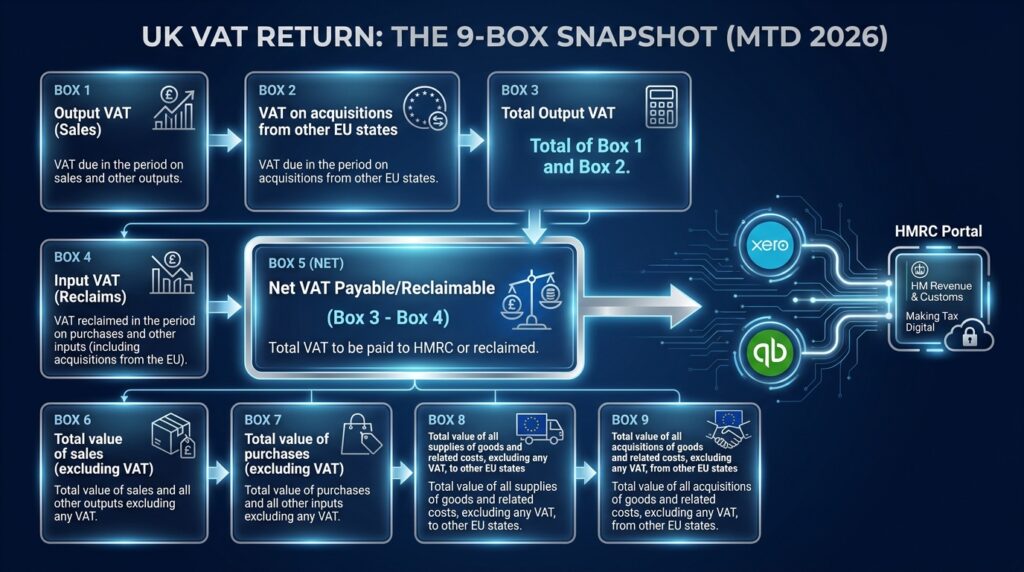
How to file VAT returns in the UK through HMRC is governed by Making Tax Digital (MTD) for VAT, mandatory for all VAT-registered businesses from April 2026.
The UK VAT return (HMRC Box 1–9):
| Box | Description |
|---|---|
| Box 1 | Output VAT due on UK sales and other outputs |
| Box 2 | VAT due on acquisitions from EU member states (NI only) |
| Box 3 | Total VAT due (Box 1 + Box 2) |
| Box 4 | Input VAT reclaimable on purchases and other inputs |
| Box 5 | Net VAT payable/reclaimable (Box 3 − Box 4) |
| Box 6 | Total value of sales and other outputs (excluding VAT) |
| Box 7 | Total value of purchases and all other inputs (excluding VAT) |
| Box 8 | Total value of supplies to EU member states (NI only) |
| Box 9 | Total value of acquisitions from EU member states (NI only) |
Filing frequency and deadline (UK):
- Most businesses: quarterly VAT returns
- Deadline: 1 month and 7 days after the end of the VAT period
- Example: VAT period ending 31 March → due 7 May
How to submit VAT return online (UK):
- Prepare your VAT figures in your MTD-compatible accounting software (Xero, QuickBooks, Sage, FreeAgent, etc.)
- The software digitally links to HMRC and submits the return directly — you do not manually re-enter data
- Review Box 5 (net payable) and pay by the same deadline as the return
How to pay VAT in the UK:
- Direct bank transfer (BACS) to HMRC’s VAT account
- Debit or corporate credit card through HMRC’s online payment portal
- Direct Debit (automatic if you set this up with HMRC)
HMRC’s VAT account details: Sort code 08 32 00, Account number 11963155, Reference: your 9-digit VRN.
How to Work Out VAT Return: The Checklist
Before finalising any VAT return — whether Mushak 9.1 in Bangladesh or the HMRC Box 1–9 in the UK — run through this professional checklist:
Bangladesh (Mushak 9.1):
- Output VAT total matches Mushak 6.2 Sales Register total for the period ✓
- Input VAT total matches Mushak 6.1 Purchase Register total ✓
- All supplier BINs on input invoices verified as active at vat.gov.bd ✓
- VDS certificates (Mushak 6.6) reconciled with amounts received ✓
- Previous month closing balance correctly carried forward ✓
- Net payable calculated: Output VAT − Input VAT − VDS − AT ± Balance ✓
- Payment challan prepared and ready to submit simultaneously ✓
UK (HMRC VAT Return):
- Box 1 output VAT reconciles to sales ledger total for the period ✓
- Box 4 input VAT reconciles to purchase ledger VAT total ✓
- Box 5 net figure confirmed (payable or reclaimable) ✓
- Box 6 and Box 7 figures match your turnover records ✓
- MTD-compatible software submission confirmed ✓
- Payment Direct Debit or bank transfer arranged if Box 5 is payable ✓
How to Avoid VAT Compliance Penalties in Bangladesh
How to avoid VAT penalties — a question I hear frequently from business owners who have already received a penalty notice. Here is the honest professional answer: you cannot legally avoid paying VAT you owe, but you can absolutely avoid the penalties that arise from non-compliance:
File every month, even nil returns. The 15th-of-month deadline for Mushak 9.1 submission is enforced automatically. Missing it — even when VAT payable is zero — generates penalty notices. BDT 5,000 per missed return accumulates quickly.
Keep records for five years. The NBR can audit any of the last five years of VAT returns. Every Mushak form, invoice, and payment challan from the last five years must be available on demand.
Never claim ITC on unverified BINs. This single discipline eliminates the most common cause of VAT audit disallowances in Bangladesh.
Reconcile your VAT returns against your income tax return. The NBR cross-matches the total sales declared across twelve monthly Mushak 9.1 returns against your annual income tax return revenue. Unexplained differences trigger formal audit inquiries. Your VAT and income tax records must tell the same story.
Frequently Asked Questions
How do I add VAT to a price in Bangladesh? Multiply the net price by 0.15 (for 15% VAT) to get the VAT amount. Add it to the net price for the gross invoice total. Example: BDT 10,000 net × 0.15 = BDT 1,500 VAT. Gross = BDT 11,500.
How do I calculate VAT inclusive? To extract VAT from a VAT-inclusive price at 15%: VAT = Gross × 15 ÷ 115. Net = Gross ÷ 1.15. Example: BDT 11,500 × 15 ÷ 115 = BDT 1,500 VAT.
How do I calculate VAT exclusive? A “VAT exclusive” price is the net price before VAT is added. To calculate the VAT exclusive price from a VAT inclusive total: Net = Gross ÷ 1.15 (at 15%). Example: BDT 11,500 ÷ 1.15 = BDT 10,000.
How do I calculate 15 percent VAT in Excel? In Excel: =A1*0.15 for VAT amount (where A1 is the net price). =A1*1.15 for VAT-inclusive total. To extract VAT from inclusive price: =A1*15/115.
How do I submit a VAT return online in Bangladesh? Log in to vat.gov.bd with your BIN, navigate to Return → Mushak 9.1, select the tax period, enter your output and input VAT figures, and submit. Pay any net VAT due through A-Challan (ibas.finance.gov.bd/acs) by the 15th of the month.
How do I submit a VAT return online in the UK? File through your MTD-compatible accounting software (Xero, QuickBooks, Sage, etc.), which connects directly to HMRC and submits your Box 1–9 figures. Deadline is 1 month and 7 days after your VAT period ends.
How do I pay VAT in Bangladesh? Generate an online challan through ibas.finance.gov.bd/acs (A-Challan system), selecting VAT as the payment category, and pay via bKash, internet banking, Rocket, Nagad, or debit/credit card. Keep the challan receipt.
What is the penalty for late VAT return submission in Bangladesh? BDT 5,000 or more per missed return, plus 2% per month interest on any unpaid VAT. Consecutive missed returns risk BIN suspension.
Final Thoughts: Calculate Once, Calculate Correctly
How to calculate VAT is a skill that touches every invoice your business issues, every purchase you record, and every monthly return you file. Getting it right from the first transaction — using the correct formula, the correct rate, and the correct mechanism for your type of supply — is infinitely cheaper than discovering accumulated errors during an NBR audit three years later.
The formulas in this guide are not complicated. Gross = Net × 1.15 for adding 15% VAT. Net = Gross ÷ 1.15 for extracting it. Net payable = Output VAT − Input VAT for your return. These three formulas cover the vast majority of VAT calculations any business in Bangladesh needs to handle daily.
How to submit VAT return online through vat.gov.bd becomes straightforward once your monthly records are maintained accurately throughout the month — not reconstructed in the 24 hours before the 15th deadline. Build that discipline, master the formulas, and VAT compliance becomes a routine that protects your business rather than a source of ongoing stress.
Need help with VAT return preparation, VAT calculations, Mushak 9.1 filing, or NBR audit defence in Bangladesh? As a tax practitioner with direct NBR and HMRC compliance experience, I provide professional VAT support for businesses across Bangladesh and the UK. Get in touch.
Tags: how to calculate vat, how to add vat, how to add vat to a price, how to calculate including vat, how to calculate vat inclusive, how to calculate vat exclusive, how to calculate vat amount, how to calculate vat and tax, how to calculate vat in accounting, how to calculate vat in bangladesh, how to calculate vat in excel, how to calculate vat payable, how to calculate vat return, how to calculate 15 percent vat, how to submit vat, how to submit vat return, how to submit vat return online, how to submit vat return online in bangladesh, how to file vat return online, how to file vat returns, how to do a vat return, how to work out vat return, how to pay vat, how much is vat, how to avoid vat, vat calculation formula bangladesh 2026Share
Leave a Reply
You must be logged in to post a comment.