Written by Md Rakib Hassan — Income Tax Practitioner with 10+ years of tax compliance and audit experience across Bangladesh and the UK. Former accounts manager at a UK chartered accounting firm managing 1,000+ clients, with direct experience resolving multi-year tax audit disputes with HMRC and the NBR. Currently Finance Controller at a UK-based multinational tech group.
Every time a business pays income tax, a citizen deposits court fees, or a company remits VAT to the government treasury in Bangladesh, there is a challan at the centre of the transaction. A challan is the official government receipt confirming that money has been deposited into the public treasury — and in 2026, this process has moved almost entirely online through Bangladesh’s e-challan BD systems.
Understanding how e-challan BD works, which portal to use for which payment type, and how to perform e-challan verification is essential knowledge for every Bangladeshi taxpayer, business owner, and finance professional. This guide covers everything: the two main e-challan systems in Bangladesh, how to generate and pay through each one, how e-challan verification works, and the practical tips that prevent the payment mistakes that cause regulatory delays.
What Is an e-Challan in Bangladesh?
A challan (চালান) is a payment voucher issued by or to the government as proof that a specific sum has been deposited into the government treasury. In Bangladesh, every formal payment to the government — income tax, VAT, customs duty, court fees, passport fees, RJSC fees, university admission fees, and hundreds of other government service charges — is recorded through a challan.
The e-challan BD system replaced the traditional paper challan process with a fully digital, internet-based payment and receipt system. Instead of visiting a bank branch, filling out paper forms, and waiting in queues, citizens and businesses can now generate challan forms online, make payments through digital channels, and receive electronic receipts — all without leaving their desk.
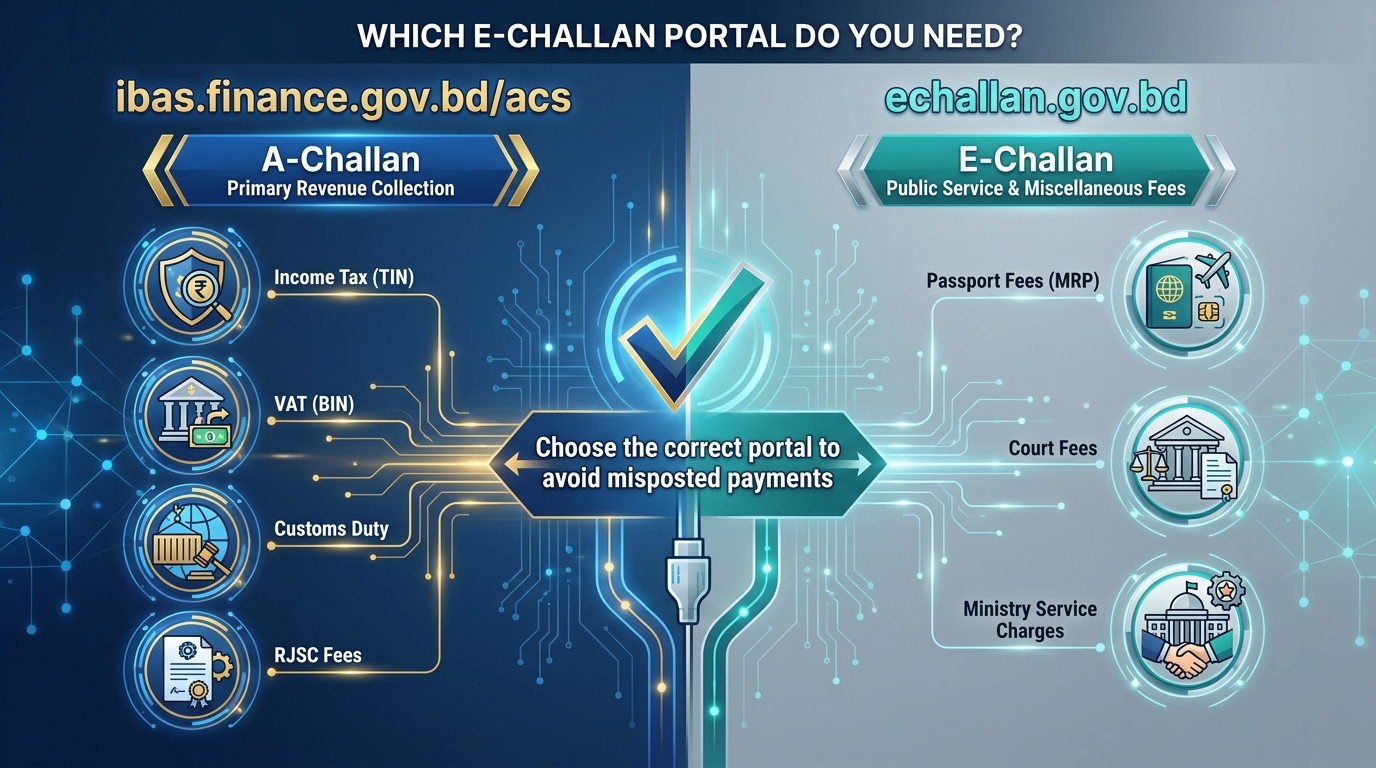
In Bangladesh, there are two principal e-challan systems, serving different payment categories:
1. A-Challan (Automated Challan System) — operated by the Finance Division under the Ministry of Finance at ibas.finance.gov.bd/acs (also accessible at www.achallan.gov.bd). The A-Challan system handles most government revenue and service fee payments, including income tax.
2. E-Challan (Praptee Batayon) — operated at echallan.gov.bd. This portal handles specific government service fees, including passport fees, certain court fees, and selected administrative charges.
A-Challan: Bangladesh’s Primary e-Challan System
The Automated Challan System (A-Challan) — commonly referred to as e-challan BD in everyday usage — is the government’s internet/web-based payment gateway introduced from fiscal year 2019–20. It was developed and is maintained by the Finance Division, Ministry of Finance, integrated directly with the iBAS++ accounting system.
The A-Challan system enables citizens and businesses to deposit all forms of government revenue and service fees directly into the government’s Treasury Single Account (TSA) at Bangladesh Bank — without requiring physical bank visits for most payment types.
Official portal: ibas.finance.gov.bd/acs or www.achallan.gov.bd
Mobile app: The A-Challan app is available for download for both Android and iOS devices.
What Can Be Paid Through A-Challan (e-Challan BD)?
The A-Challan system covers a wide range of government payments, including:
- Income Tax — advance tax, self-assessment tax, TDS deposits by employers and businesses
- VAT (Value Added Tax) — monthly VAT liability payments, VAT deducted at source
- Customs Duty — import duty and other customs-related payments
- RJSC fees — company registration fees, annual return filing fees, name clearance fees
- Court and judicial fees
- Government university admission and examination fees
- Various ministry and directorate service charges
For income tax practitioners and businesses, the A-Challan is the primary e-challan BD system for all tax-related government payments.
How to Pay Using A-Challan (e-Challan BD): Step-by-Step
Step 1: Access the A-Challan Portal
Visit ibas.finance.gov.bd/acs or www.achallan.gov.bd. The portal is accessible from any browser and is also available through the A-Challan mobile app.
Step 2: Select the Payment Category
Choose the appropriate payment category from the main menu:
- Income Tax
- VAT
- Customs Duty
- Other Government Fees
Step 3: Enter Payment Details
Depending on the payment type, you will need to provide:
For income tax payments:
- Your 12-digit TIN (Tax Identification Number)
- Assessment year
- Head of account (income tax code)
- Amount to be paid
- Nature of payment (advance tax, self-assessment, TDS deposit, etc.)
For VAT payments:
- Your BIN (Business Identification Number)
- VAT period
- Amount payable
For other fees:
- Relevant identification number (RJSC registration number, etc.)
- Fee category and amount
Step 4: Review the Draft e-Challan
Before proceeding to payment, carefully review the draft e-challan BD generated by the system. Confirm:
- Your name and TIN/BIN are correct
- The assessment year or period is correct
- The payment head/code is correct
- The amount is correct
Critical warning: Once payment is made through the e-challan BD system, no modification to the challan details is possible. Any information entered — name, TIN, amount, head of account — is permanently recorded. If you make an error and pay anyway, correcting it requires a formal application to the relevant authority and can take weeks. Always verify every field before clicking pay.
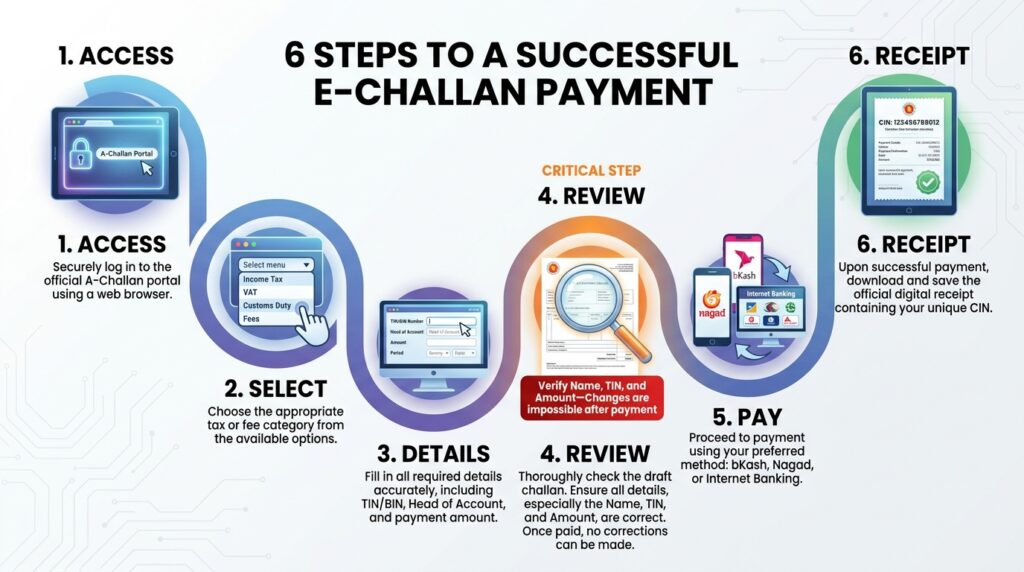
Step 5: Select Payment Method and Pay
The A-Challan system accepts the following payment methods:
Internet Banking: Through scheduled commercial banks including Sonali Bank, Janata Bank, Agrani Bank, Rupali Bank, and numerous private scheduled banks.
Debit/Credit Card: Through the integrated payment gateway. Cardholders may need to activate e-commerce transaction facility with their bank before first use.
Mobile Financial Services:
- bKash — the most widely used MFS for e-challan BD payments
- Rocket (Dutch-Bangla Bank)
- Nagad
Sonali Bank Direct Transfer: For Sonali Bank account holders, direct account debit is available.
After selecting your payment method and completing the transaction, the system generates a final e-challan receipt — your official proof that the payment has been made and recorded in the government treasury.
Step 6: Print or Save Your e-Challan Receipt
Download, print, or save the e-challan BD receipt immediately. This challan receipt contains:
- A unique Challan Identification Number (CIN) or Transaction Reference Number
- The head of account to which the payment was credited
- The date and time of payment
- The exact amount deposited
- Your TIN/BIN/identifier
This receipt is your primary legal evidence of government payment. It is required when:
- Submitting your income tax return (to attach TDS challans)
- Filing VAT returns (as payment proof)
- Registering a company or filing annual returns with RJSC
- Completing any government service that required fee payment
E-Challan Verification: How to Verify Your Challan Is Valid
E-challan verification is the process of confirming that a challan payment has been successfully recorded in the government’s accounting system — and has not been altered, duplicated, or fabricated.
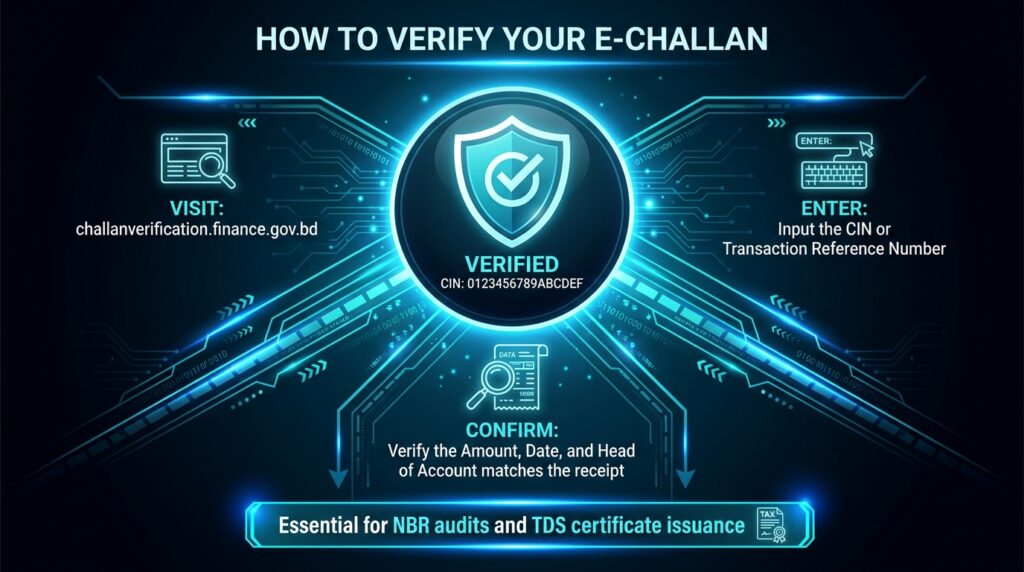
In Bangladesh, e-challan verification is available through the Finance Division’s dedicated portal:
E-Challan Verification Portal: challanverification.finance.gov.bd/echalan/
This is the Automated Challan Verification (স্বয়ংক্রিয় চালান যাচাই) system operated by the Ministry of Finance.
Why E-Challan Verification Matters
E-challan verification is important for several reasons:
For taxpayers: Confirming that your income tax or VAT payment has been properly credited to the government treasury — and that the challan you hold will be accepted by the NBR or VAT authority when you file your return.
For businesses deducting TDS: When you withhold tax from employees or suppliers and deposit it via e-challan BD, you need to confirm the deposit is properly recorded before issuing TDS certificates.
For government offices and banks: Authenticating challan receipts submitted by citizens and businesses as proof of payment. Fabricated challans are a documented fraud risk — e-challan verification provides instant authentication.
For NBR auditors: During income tax or VAT audits, the NBR verifies every challan submitted as payment evidence against the government’s central records. Unverifiable challans — even if they look legitimate — are rejected.
How to Perform E-Challan Verification: Step-by-Step
Method 1: Through the Finance Division Challan Verification Portal
- Visit challanverification.finance.gov.bd/echalan/
- Enter the challan identification number or transaction reference number (printed on your challan receipt)
- Enter any additional verification details required (date, amount, or TIN)
- Click “Verify” to retrieve the challan status
- The system confirms whether the challan is valid, the amount credited, the head of account, and the date of deposit
Method 2: Through the iBAS++ System (for government finance officers)
Government Drawing and Disbursement Officers (DDOs) and accounts office staff can verify challan records directly through the iBAS++ system, which maintains real-time records of all A-Challan payments credited to the Treasury Single Account.
Method 3: Through the NBR-Sonali Bank e-Payment Portal
For income tax and VAT challans paid through the NBR-Sonali Bank portal at nbrepayment.gov.bd, the payment status can be verified by logging in and checking your payment history.
E-Challan BD for Income Tax Payments: Specific Guidance
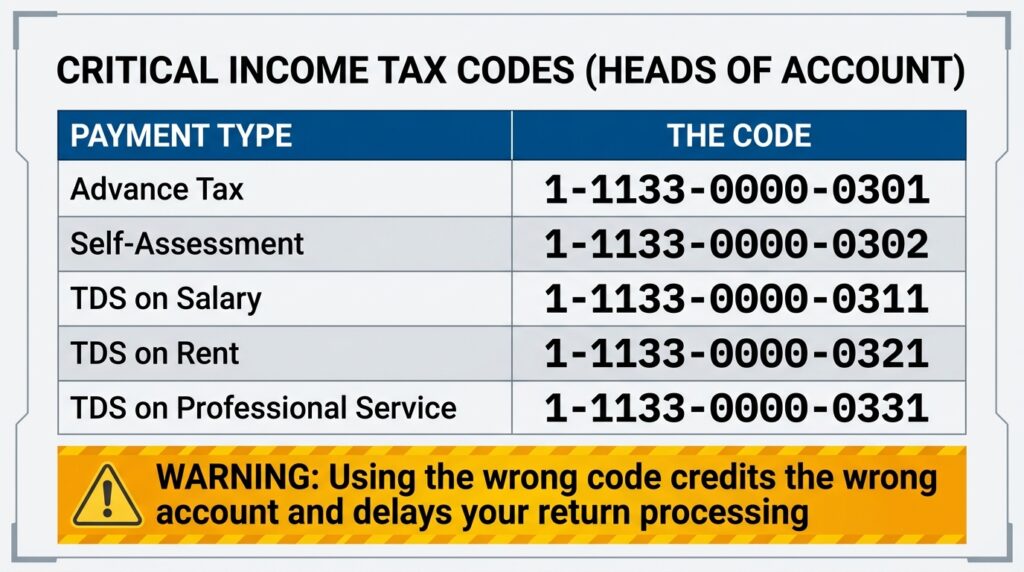
For Bangladesh’s income tax practitioners, accountants, and business finance officers, the e-challan BD process for tax payments requires particular attention to the head of account (হিসাব শিরোনাম) — the specific budget code that determines which treasury account receives the payment.
Common Income Tax Payment Heads
| Payment Type | Head of Account |
|---|---|
| Advance Tax (Section 154 onwards) | 1-1133-0000-0301 |
| Self-Assessment Tax | 1-1133-0000-0301 |
| TDS on Salary (Section 86) | 1-1133-0000-0301 |
| TDS on Contractor/Supply (Section 88) | 1-1133-0000-0311 |
| TDS on Rent (Section 89) | 1-1133-0000-0321 |
| TDS on Professional Service (Section 90) | 1-1133-0000-0341 |
Critical professional tip from my practice: Using the wrong head of account when generating an e-challan BD for income tax is one of the most common errors I encounter among small businesses. The payment still reaches the government treasury — but it is credited to the wrong account. The NBR cannot match it against your TIN and tax year when processing your return. Correcting a misposted challan requires a formal letter to the tax circle and can delay return processing by weeks. Always confirm the correct head of account before generating any e-challan.
E-Challan BD for VAT Payments
Businesses registered for VAT (holding a BIN — Business Identification Number) use the e-challan BD system to pay their monthly VAT liability. The process mirrors the income tax challan process but uses your BIN instead of your TIN as the primary identifier.
Key points for VAT e-challan BD payments:
- VAT payments must be made by the 15th of the following month (e.g., January VAT payable by 15 February)
- Late VAT payments attract both late payment interest (2% per month on unpaid tax) and potential penalties
- Each monthly VAT challan must be preserved as it is submitted alongside the monthly Mushak-9.1 return
- E-challan verification of VAT payments is routinely performed during NBR VAT audits
E-Challan (echallan.gov.bd): The Second System for Government Service Fees
Distinct from the A-Challan system, the government also operates e-challan BD through echallan.gov.bd — the Praptee Batayon (প্রাপ্তি বাতায়ন) system managed by the Ministry of Finance.
This portal handles specific government service fee payments, most notably:
- Passport fees (Machine Readable Passport — MRP)
- Certain court and judicial fees
- Specific ministry and directorate service charges
Important note for passport applicants: If you are paying passport fees online in Bangladesh, use echallan.gov.bd — not the A-Challan portal at ibas.finance.gov.bd. The two systems handle different categories of government receipts.
For passport fee payments specifically: once payment through the e-challan BD system is complete and confirmed, no modification to your submitted information is possible. Verify all your personal details on the challan form before making payment. Errors in the passport challan require formal written applications to the Department of Immigration and Passports for correction — a process that can significantly delay your passport application.
NBR-Sonali Bank e-Payment Portal: Dedicated Tax e-Challan
For income tax, VAT, and customs duty payments, the NBR also operates a dedicated e-payment portal in partnership with Sonali Bank at nbrepayment.gov.bd.
This portal accepts:
- Income tax payments (advance tax, self-assessment, TDS deposits)
- VAT payments
- Customs duty payments
- Bond payments
Payment methods at nbrepayment.gov.bd:
- Sonali Bank account transfer
- Sonali Bank debit/credit/prepaid cards
- Mobile Financial Services: bKash, Rocket
- Other bank debit/credit cards (e-commerce enabled)
After payment, the portal generates an e-challan receipt that serves as your official tax payment proof. This is directly linked to the NBR’s core tax system, making e-challan verification through the government’s verification portal straightforward.
Common Problems with e-Challan BD and How to Solve Them
Problem: Payment completed but challan not received Sometimes network interruptions during payment cause the system to process the debit but fail to generate the challan receipt. Action: Check your bank account or MFS transaction history to confirm the debit. Log back into the e-challan BD portal and check your payment history. If the payment is confirmed debited but no challan appears, contact the NBR helpline (09643 71 71 71) or the A-Challan help desk.
Problem: Wrong amount entered on the challan If you realise the error before payment: exit and start again. If discovered after payment: contact your tax circle office with a formal written application explaining the discrepancy. You may need to pay the additional amount through a fresh e-challan and apply for credit adjustment.
Problem: Payment debited but challan shows “pending” status A-Challan payments made via internet banking or MFS typically reflect in the system within a few hours, but can take up to 24 hours during peak periods. Wait 24 hours and then perform e-challan verification again before escalating.
Problem: Challan verification fails for a valid payment This can occur if the challan was generated under a different system (e.g., a paper challan from a bank branch rather than the online A-Challan portal). Physical bank branch challans may not be verifiable through the online e-challan verification portal. Always use the digital e-challan BD system to ensure full verifiability.
Frequently Asked Questions About e-Challan BD
What is e-challan BD? E-challan BD is Bangladesh’s digital government payment system, enabling citizens and businesses to pay income tax, VAT, customs duty, government fees, and other public revenue online. The primary system is the Automated Challan (A-Challan) operated at ibas.finance.gov.bd/acs. A separate system at echallan.gov.bd handles specific service fees like passport charges.
How do I verify an e-challan in Bangladesh? Visit the e-challan verification portal at challanverification.finance.gov.bd/echalan/ and enter your challan number and relevant details. The system confirms whether the payment is valid and properly recorded in the government treasury.
Can I pay income tax through bKash using e-challan BD? Yes. The A-Challan system at ibas.finance.gov.bd/acs and the NBR-Sonali Bank portal at nbrepayment.gov.bd both accept bKash payments for income tax. This is the most popular payment method for individual taxpayers.
Is the e-challan receipt the same as an income tax certificate? No. An e-challan receipt proves that a payment has been made to the government treasury. Your income tax certificate is a separate document generated by the NBR’s e-return system (etaxnbr.gov.bd) after your annual tax return has been successfully filed.
What happens if I use the wrong head of account on my e-challan? The payment reaches the treasury but is misposted. It will not automatically match against your TIN or tax year. You must submit a formal correction request to your tax circle or the relevant authority with your challan number and the correct head of account. Start the correction process early — before your return filing deadline.
Can I cancel an e-challan after payment? No. Once payment is completed through the e-challan BD system, cancellation is not possible. Incorrect or duplicate payments must be resolved through formal applications to the relevant government authority for refund or adjustment. This is why verifying all details before paying is essential.
Where can I get help with A-Challan or e-challan problems?
- NBR Helpline: 09643 71 71 71 (9 AM to 5 PM, working days)
- A-Challan Help Desk: Via the iBAS++ portal or Ministry of Finance contact channels
- NBR Sonali Bank Portal: Contact details available at nbrepayment.gov.bd
Final Thoughts: Master e-Challan BD Before Your Next Government Payment
Bangladesh’s e-challan BD systems — the A-Challan at ibas.finance.gov.bd and echallan.gov.bd — represent a genuine leap forward in public financial management. What once required bank queue time, paper forms, and manual reconciliation can now be completed in minutes from any device.
But the irreversibility of e-challan payments means that errors are expensive and slow to correct. From my direct experience working with NBR audits, the most common challan-related compliance problem is not payment fraud — it is honest mistakes in head of account selection, assessment year entry, or TIN recording that then take months to untangle.
Use the e-challan BD system. Use the e-challan verification portal to confirm every significant payment. Keep every challan receipt permanently. And if you are unsure about the correct payment category, head of account, or process for a specific government payment — ask a professional before you click pay, not after.
Have questions about e-challan payments, income tax payment codes, VAT challan processes, or NBR compliance for your business in Bangladesh? As an Income Tax Practitioner with direct NBR audit experience, I guide individuals and businesses through all aspects of tax payment and compliance. Get in touch for professional support.
Tags: e challan bd, e challan verification, challan bangladesh, a-challan bangladesh, income tax payment bangladesh, VAT payment bangladesh, ibas.finance.gov.bd, echallan.gov.bd, NBR tax payment, challan verification bangladesh 2026Share
Leave a Reply
You must be logged in to post a comment.